
Sign in to continue
Don't have an account? Create one
Shop By
Wide Format
File Format: Submit files in PDF, AI, or EPS format for best compatibility. Avoid using JPG or PNG unless specified. Upload single PDF files for each version, each side.
Trim and Safe Zones: Keep important text and design elements 0.125" inside the trim line to prevent accidental trimming.
Color Profiles: Use U.S. Web Coated (SWOP) v2 or GRACoL color profiles to ensure color accuracy.
File Size: For optimal quality, aim to keep file sizes within 1MB to 10MB. Business card files typically fall within this range, ensuring they are manageable while retaining detail.
Artboard Size: Set your artboard to the final size plus 0.25"
bleed.
Example: For a 2" x 3.5" business card, create your artwork at 2.25" x 3.75".
Resolution: Ensure all images and designs are at 300 DPI for the best print quality.
Fonts: Convert all fonts to outlines to avoid font compatibility issues. Minimum recommended font size is 6pt.
Images: Embed all linked images to ensure they are included in the final file.
Color Mode: Set the color mode to CMYK for accurate color reproduction. If provided in RGB, we will convert to CMYK, but note that this may cause slight color shifts.
Standard print processes use four colors (cyan, magenta, yellow and black) to create the entire spectrum of printed colors. Printing white as a color cannot be done with the standard process, instead, we use a Spot color to produce specially formulated white ink. White ink is commonly used to improve visibility on non-white substrates such as colored paper, metallic BOPP, or transparent material. It may also be used creatively to mask areas of the substrate where you do not want the material to show through, like in the case of metallic BOPP.
How To Set Up White Support
- In Adobe Illustrator, create a new layer named “White”. This layer stays on top, and will contain areas you would like to have the white ink printed.
- To create the Spot color, first delete the existing White swatch in your Swatches Window.
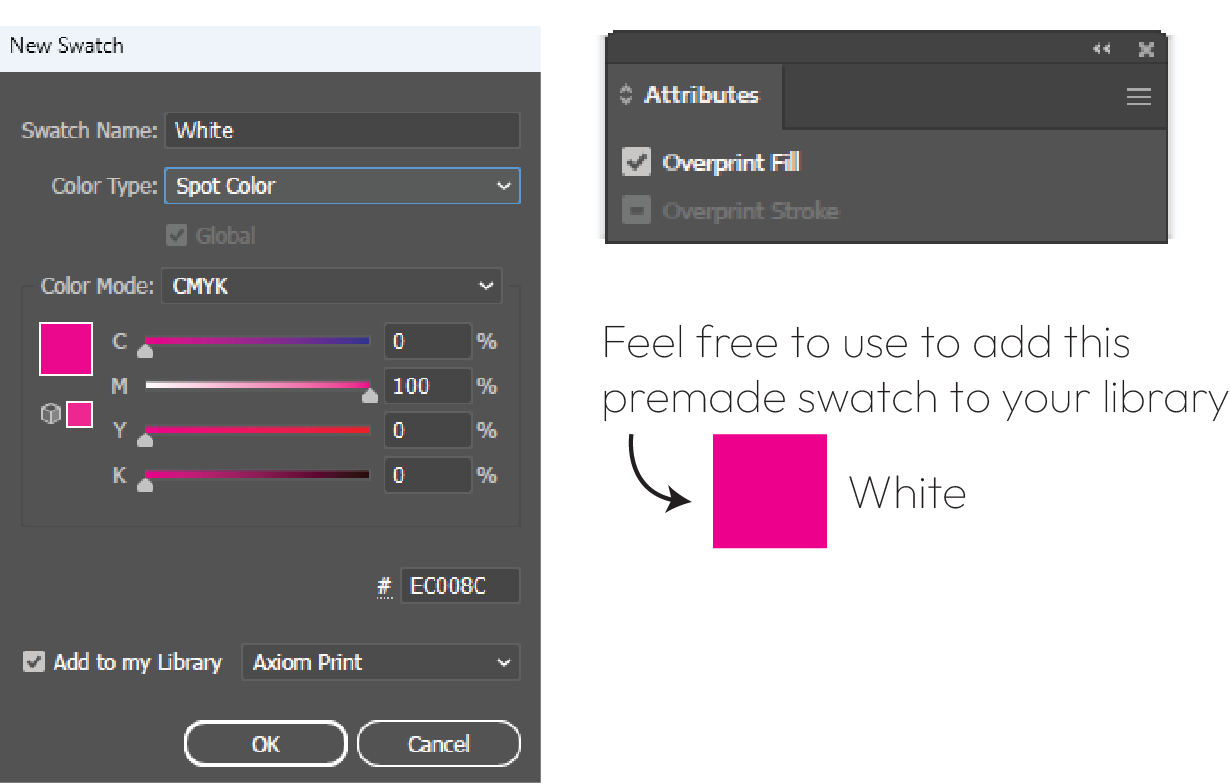
- Then, click “New Swatch”, change Swatch Name to White, Color Type to Spot Color, Color Mode to CMYK, and make the color 100% M.
- Lastly, check on Overprint Fill in the Attributes Window. This will tell the system that this is a special Spot color, and not just a magenta color.
File Setup:
- All foil areas must be set to 100% black (C: 0%, M: 0%, Y: 0%, K: 100%).
- Provide the foil file as a separate PDF file containing only foil elements.
- Ensure perfect alignment between the foil file and the main artwork.
- Include a 0.125-inch bleed (each side) and keep important foil elements 0.125 inches away from cutting edges.
Areas to Consider:
- Don’t use gradients or tints for foil areas.
- Don't use Foil as a thin border, close to edges. It may shift and look off-centered after cutting.
- Vector files are always better for foil. We can do raster, but for the best outcome use vector format.
File Setup: Embellishments such as Raised Spot UV should be saved as a separate file, preferably in Vector format
- All Spot UV areas must be set to 100% black (C: 0%, M: 0%, Y: 0%, K: 100%).
- Provide the SPOT UV file as a separate PDF file containing only SPOT UV elements.
- Ensure perfect alignment between the SPOT UV file and the main artwork.
- Include a 0.125-inch (3mm) bleed and keep important elements 0.125 inches away from edges.
Areas to Consider:
- Don’t use gradients or tints for SPOT UV areas.
- Don't use SPOT UV as a thin border, close to edges. It may shift and look off-centered after cutting.
- Vector files are always better for SPOT UV. We can do raster, but for the best outcome use vector format.
- Fonts less than 8pt are not recomended to be Spot UV. It's too thin and doesn't give the best outcome.
- Spot UV shouldn't be used on the area where we have Score, Perf or Cut. There is a chance it will crack or peel.
Not available
Digital / Offset
Artboard Size: Set your artboard to the final size plus 0.25"
bleed.
Example: For a 2" x 3.5" business card, create your artwork at 2.25" x 3.75".
Resolution: Ensure all images and designs are at 300 DPI for the best print quality.
Fonts: Convert all fonts to outlines to avoid font compatibility issues. Minimum recommended font size is 6pt.
Images: Embed all linked images to ensure they are included in the final file.
Color Mode: Set the color mode to CMYK for accurate color reproduction. If provided in RGB, we will convert to CMYK, but note that this may cause slight color shifts.
File Format: Submit files in PDF, AI, or EPS format for best compatibility. Avoid using JPG or PNG unless specified. Upload single PDF files for each version, each side.
Trim and Safe Zones: Keep important text and design elements 0.125" inside the trim line to prevent accidental trimming.
Color Profiles: Use U.S. Web Coated (SWOP) v2 or GRACoL color profiles to ensure color accuracy.
File Size: For optimal quality, aim to keep file sizes within 1MB to 10MB. Business card files typically fall within this range, ensuring they are manageable while retaining detail.
Standard print processes use four colors (cyan, magenta, yellow and black) to create the entire spectrum of printed colors. Printing white as a color cannot be done with the standard process, instead, we use a Spot color to produce specially formulated white ink. White ink is commonly used to improve visibility on non-white substrates such as colored paper, metallic BOPP, or transparent material. It may also be used creatively to mask areas of the substrate where you do not want the material to show through, like in the case of metallic BOPP.
How To Set Up White Support
- In Adobe Illustrator, create a new layer named “White”. This layer stays on top, and will contain areas you would like to have the white ink printed.
- To create the Spot color, first delete the existing White swatch in your Swatches Window.
- Then, click “New Swatch”, change Swatch Name to White, Color Type to Spot Color, Color Mode to CMYK, and make the color 100% M.
- Lastly, check on Overprint Fill in the Attributes Window. This will tell the system that this is a special Spot color, and not just a magenta color.
File Setup:
- All foil areas must be set to 100% black (C: 0%, M: 0%, Y: 0%, K: 100%).
- Provide the foil file as a separate PDF file containing only foil elements.
- Ensure perfect alignment between the foil file and the main artwork.
- Include a 0.125-inch bleed (each side) and keep important foil elements 0.125 inches away from cutting edges.
Areas to Consider:
- Don’t use gradients or tints for foil areas.
- Don't use Foil as a thin border, close to edges. It may shift and look off-centered after cutting.
- Vector files are always better for foil. We can do raster, but for the best outcome use vector format.
File Setup: Embellishments such as Raised Spot UV should be saved as a separate file, preferably in Vector format
- All Spot UV areas must be set to 100% black (C: 0%, M: 0%, Y: 0%, K: 100%).
- Provide the SPOT UV file as a separate PDF file containing only SPOT UV elements.
- Ensure perfect alignment between the SPOT UV file and the main artwork.
- Include a 0.125-inch (3mm) bleed and keep important elements 0.125 inches away from edges.
Areas to Consider:
- Don’t use gradients or tints for SPOT UV areas.
- Don't use SPOT UV as a thin border, close to edges. It may shift and look off-centered after cutting.
- Vector files are always better for SPOT UV. We can do raster, but for the best outcome use vector format.
- Fonts less than 8pt are not recomended to be Spot UV. It's too thin and doesn't give the best outcome.
- Spot UV shouldn't be used on the area where we have Score, Perf or Cut. There is a chance it will crack or peel.
Not available
Short-Web Roll
Artboard Size: Set your artboard to the final size plus 0.25"
bleed.
Example: For a 2" x 3.5" business card, create your artwork at 2.25" x 3.75".
Resolution: Ensure all images and designs are at 300 DPI for the best print quality.
Fonts: Convert all fonts to outlines to avoid font compatibility issues. Minimum recommended font size is 6pt.
Images: Embed all linked images to ensure they are included in the final file.
Color Mode: Set the color mode to CMYK for accurate color reproduction. If provided in RGB, we will convert to CMYK, but note that this may cause slight color shifts.
File Format: Submit files in PDF, AI, or EPS format for best compatibility. Avoid using JPG or PNG unless specified. Upload single PDF files for each version, each side.
Trim and Safe Zones: Keep important text and design elements 0.125" inside the trim line to prevent accidental trimming.
Color Profiles: Use U.S. Web Coated (SWOP) v2 or GRACoL color profiles to ensure color accuracy.
File Size: For optimal quality, aim to keep file sizes within 1MB to 10MB. Business card files typically fall within this range, ensuring they are manageable while retaining detail.
Standard print processes use four colors (cyan, magenta, yellow and black) to create the entire spectrum of printed colors. Printing white as a color cannot be done with the standard process, instead, we use a Spot color to produce specially formulated white ink. White ink is commonly used to improve visibility on non-white substrates such as colored paper, metallic BOPP, or transparent material. It may also be used creatively to mask areas of the substrate where you do not want the material to show through, like in the case of metallic BOPP.
How To Set Up White Support
- In Adobe Illustrator, create a new layer named “White”. This layer stays on top, and will contain areas you would like to have the white ink printed.
- To create the Spot color, first delete the existing White swatch in your Swatches Window.
- Then, click “New Swatch”, change Swatch Name to White, Color Type to Spot Color, Color Mode to CMYK, and make the color 100% M.
- Lastly, check on Overprint Fill in the Attributes Window. This will tell the system that this is a special Spot color, and not just a magenta color.
File Setup:
- All foil areas must be set to 100% black (C: 0%, M: 0%, Y: 0%, K: 100%).
- Provide the foil file as a separate PDF file containing only foil elements.
- Ensure perfect alignment between the foil file and the main artwork.
- Include a 0.125-inch bleed (each side) and keep important foil elements 0.125 inches away from cutting edges.
Areas to Consider:
- Don’t use gradients or tints for foil areas.
- Don't use Foil as a thin border, close to edges. It may shift and look off-centered after cutting.
- Vector files are always better for foil. We can do raster, but for the best outcome use vector format.
File Setup: Embellishments such as Raised Spot UV should be saved as a separate file, preferably in Vector format
- All Spot UV areas must be set to 100% black (C: 0%, M: 0%, Y: 0%, K: 100%).
- Provide the SPOT UV file as a separate PDF file containing only SPOT UV elements.
- Ensure perfect alignment between the SPOT UV file and the main artwork.
- Include a 0.125-inch (3mm) bleed and keep important elements 0.125 inches away from edges.
Areas to Consider:
- Don’t use gradients or tints for SPOT UV areas.
- Don't use SPOT UV as a thin border, close to edges. It may shift and look off-centered after cutting.
- Vector files are always better for SPOT UV. We can do raster, but for the best outcome use vector format.
- Fonts less than 8pt are not recomended to be Spot UV. It's too thin and doesn't give the best outcome.
- Spot UV shouldn't be used on the area where we have Score, Perf or Cut. There is a chance it will crack or peel.
Not available